Interactive Demos for Enterprise Sales Teams
This blog explains why interactive product demos transform enterprise sales and how to scale them using DemoDazzle. It argues interactive demos—clickable sandboxes, simulations, and guided flows with pre-filled data and branching—raise engagement, shorten sales cycles, improve rep efficiency, and produce usable analytics. The post gives practical tactics: persona templates, contextual sample data, branching logic, automated handoffs, and persona-based CTAs; a people-process-platform model; metrics to track; common pitfalls; and a three-week rollout. It offers quick examples, optimization tips, and tool priorities. The overall purpose is a practical how-to guide for launching measurable, scalable interactive-demo programs and accelerating pipeline conversion for teams.
If you work in enterprise sales, pre-sales, product marketing, or revenue ops, you’ve probably heard the case for interactive product demos. With DemoDazzle, the promise goes further boosting engagement, shortening sales cycles, and enabling buyers to self-validate value before ever speaking to a rep. But how do you actually make that happen at scale with DemoDazzle? And what separates a generic, clunky walkthrough from a DemoDazzle experience that genuinely moves deals forward?
I've worked with teams who swapped most of their slide decks for interactive experiences and saw meaningful lift in demo conversion rates. In my experience, the right approach mixes automation, personalization, and a clear feedback loop to sales. This guide walks through why interactive demos matter, how to design them, common mistakes to avoid, and a practical roadmap you can use right away.
Why interactive product demos matter for enterprise teams
Traditional sales-led demos are valuable, but they have limits. Scheduling conflicts, inconsistent delivery, and presenter bias all slow buyer momentum. Interactive demos change the dynamic: they let buyers explore on their own terms, discover value faster, and bring better-qualified questions to your reps.
Here are the core benefits I see repeatedly.
- Higher engagement. People will click through a short, relevant demo when they will not take a 60 minute calendar invite. That initial engagement helps you capture intent early.
- Scalability. You only need to build an interactive demo once, then you can reuse and personalize it at scale for different segments and use cases.
- Shorter sales cycles. Buyers who self-validate key features arrive to the sales call further along and more ready to commit.
- Better rep efficiency. Pre-sales engineers spend less time repeating the same basic walkthroughs and more time on advanced Q&A and architecture.
- Quantifiable insights. Demo analytics reveal which features matter, which paths buyers take, and where they get stuck.
Call it a conversion problem, not a training problem. Interactive demos help solve it by shifting discovery earlier in the funnel.
What I mean by interactive demo
Let’s be specific. When I say interactive product demo I mean an experience where a buyer can click, enter sample data, toggle settings, and see real responses — not a static video or a slide deck. It could be:
- A guided, step-by-step sandbox with prompts and tooltips
- A self-guided demo that highlights common workflows
- A simulation that mimics product responses with sample data
- An embedded feature explorer inside your marketing pages
All these are delivered via a SaaS demo platform or product demo software. The key is that buyers do something, and the demo responds, giving immediate, tangible proof of value.
How interactive demos improve buyer engagement and conversions
I've noticed buyers trust what they can touch. When they try a feature and it works, their confidence jumps. That drives better meetings and shorter cycles.
Here are the mechanisms at work, with real-world implications:
- Active learning beats passive watching. Sitting in front of a 30 minute demo often leads to passive listening. When prospects click, they better retain details and form relevant questions.
- Personalization increases perceived relevance. Personalized demo paths show buyers scenarios that match their role, industry, or problem. That relevance converts faster.
- Data-driven follow-ups. Demo analytics tell you which features they tried and where they dropped off. Reps can follow up with targeted messaging, not generic recaps.
- Lower friction for discovery. Buyers don’t have to coordinate schedules to see product value. They can self-serve during research hours and then request a tailored session.
Types of interactive demos and when to use them
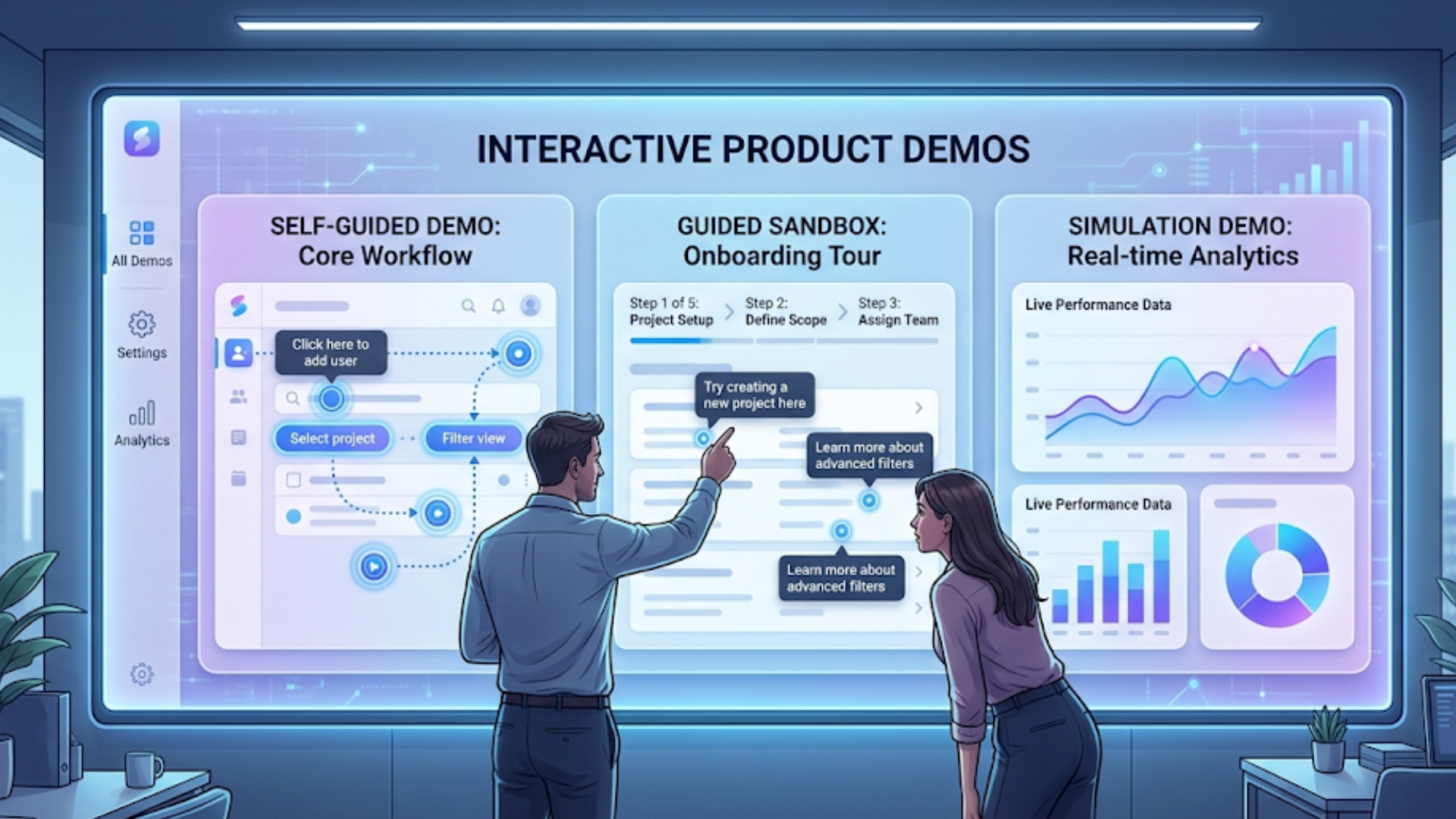
Not every demo needs to be the same. Use the right type for your funnel stage and buyer expectations.
- Self-guided demos. Best for top-of-funnel demand capture. These let buyers explore features at their own pace and create a low-friction path to request a full sales demo later.
- Guided sandboxes. Great mid-funnel. Provide structure with prompts and recommended paths, while still letting users interact. Useful for technical buyers who need to validate integrations or flows.
- Simulation demos. Use these when you need to demonstrate complex automations or data transformations without exposing a full backend. Simulations can be faster to maintain.
- Role-based flows. Tailor the demo to buyer personas: CFOs see ROI dashboards, engineers see API workflows, and product managers see configuration options.
Think of it as a demo toolkit you can combine. A marketing page might host a short self-guided demo to qualify interest. Qualified visitors get an invite to a guided sandbox or a live pre-sales session.
Demo automation and personalization strategies that actually work
Automation alone won't fix a poor demo. But when you automate the right parts, you free your reps to do higher-value work and create consistent buyer experiences.
Here are practical strategies I recommend implementing first. You can iterate after you see the analytics.
1. Start with persona templates
Build 3 to 5 personas that map to your typical buyers. For each persona, create a demo path that highlights the problems they care about and the features that solve them.
Example: For an enterprise observability platform
- Site Reliability Engineer path: Show alerting, incident playback, and integrations
- Platform Team path: Highlight multi-cluster deployment and policy controls
- VP of Engineering path: Surface ROI, MTTR reductions, and executive dashboards
Templates make personalization fast. Reps toggle a cadence or a feature flag and the demo content updates.
2. Pre-fill data and contextualize
Buyers disengage when they see demo screens filled with generic data. Replace placeholders with industry-relevant sample data based on the visitor’s company size or vertical.
Simple rule: pre-fill a name, domain, and three realistic records. That small change makes a big difference in perceived relevance.
3. Use branching logic for discovery
Prompt buyers with a short question or two, then route them to a demo path based on their answers. Branching keeps the demo short and focused.
Example flow:
- Quick question: Do you care most about security or performance?
- Choose security: demo shows access controls and compliance reports
- Choose performance: demo shows caching, latency charts, and scalability tests
4. Automate handoff with contextual summaries
When a buyer requests a live demo, send the rep a one-page summary with the demo path taken, time-on-feature, and any errors the buyer hit. Reps don’t have to guess what buyers already saw.
5. Personalize messaging and CTAs
Match CTAs to the demo path. If someone spends time in the security flow, offer a risk assessment workshop rather than a generic product walkthrough. Small alignment increases scheduled demo acceptance rates.
Building a scalable demo program: people, process, and platform
Scaling interactive demos isn’t just a technology problem. You need clear roles and a repeatable process. Here’s a practical model that’s worked for teams I’ve advised.
Roles and responsibilities
- Product Marketing creates persona templates, messaging, and sample data sets.
- Pre-sales / Solutions Engineers validate technical accuracy, design guided sandboxes, and own complex live demos.
- Revenue Operations integrates demo analytics with the CRM and tracks funnel impact.
- Sales Reps use contextual summaries to run efficient follow-ups and close faster.
- Product Team contributes feature priorities and ensures demos reflect current capabilities.
Process: a simple demo lifecycle
- Design persona paths and build demo content in your product demo software.
- Deploy demos on marketing pages and sandbox environments for mid-funnel prospects.
- Capture analytics and funnel events, pushing them into your CRM.
- Automatically notify the assigned rep when a prospect reaches a qualification threshold.
- Rep follows up with tailored messaging based on the demo activity and asks for a live session if needed.
- Measure and iterate monthly based on what features drive conversions.
Make the handoff frictionless. In my experience, fast context wins. If reps have to dig for info, momentum is lost.
Demo experience optimization: practical tips
Small changes often yield the biggest gains. Try these optimizations early in your program.
- Keep the first interaction under 3 minutes. If a buyer isn’t seeing value quickly, they’ll close the demo. Lead with the "aha" moment.
- Use micro-tutorials. Short tooltips can teach critical functionality without overwhelming the user.
- Limit choices. Present 2 to 3 clear next steps. Too many options paralyze decision making.
- Load times matter. Optimize assets and use lightweight simulations where possible. Slow demos kill conversion.
- Make it easy to ask for help. Include a "talk to an expert" button that captures the current demo context.
Demo analytics: what to track and why
Analytics turn demos from art into a repeatable science. Here's a practical set of metrics to track, ranked by importance for enterprise sales teams.
- Demo start to request ratio. How many who start a demo request a live session? This is a core conversion metric.
- Feature engagement. Which features get clicks, and how long do buyers spend there?
- Drop-off points. Where do viewers stop the demo? That tells you where to tighten flows or add clarity.
- Time-to-aha. How long until a buyer reaches a core value moment? Shorter is better.
- Qualified demo acceptance. How many demo requests convert into scheduled calls with the right stakeholders?
- Deal velocity. Compare closed-won cycle times between buyers who used interactive demos and those who did not.
Integrate these signals with your CRM. When revenue ops can segment by demo behavior, you’ll find patterns that guide content and process improvements.
Common mistakes and pitfalls
I've seen teams slip on the same things. Avoid these mistakes if you want a demo program that scales.
- Too much complexity too soon. Don’t try to simulate every edge case at launch. Start with core flows that prove value.
- One demo fits all. Generic demos feel irrelevant. Persona-based paths are essential for enterprise buyers.
- Poor integrations. If the demo analytics live in a separate silo, reps won’t use the data. Connect to your CRM and sequence engines.
- No maintenance plan. Demos go stale as product features evolve. Schedule quarterly reviews with the product team.
- Ignorance of security concerns. Enterprise buyers care about data handling. Make sandbox boundaries and sample data explicit.
Fix these early and you’ll save time later.
Quick demo playbook: a three-week rollout
Here is a lightweight rollout that I recommend for teams new to interactive demos. It’s fast and practical.
Week 1: Plan and prototype
- Pick 2 buyer personas. Map their 3 core use cases.
- Draft scripts for a 2 minute self-guided demo and a 5 minute guided sandbox.
- Choose a demo platform or pilot with a product demo software vendor.
- If you're just getting started, this startup demo strategy guide can help you build a strong foundation before scaling interactive demos
Week 2: Build and test
- Create persona templates and pre-fill sample data.
- Run internal tests with sales and pre-sales teams. Capture feedback.
- Instrument analytics and push events to a staging CRM environment.
Week 3: Launch and iterate
- Deploy the demo on a marketing landing page and add it to reps’ demo toolkit.
- Monitor key metrics: starts, time-to-aha, and demo request rate.
- Hold a 30 minute retrospective with sales and product to prioritize fixes.
That’s it. You’ll have a usable, measurable demo experience in three weeks. Then keep iterating.
Simple examples you can copy
Below are two short examples that show how to structure persona paths. Keep them intentionally simple so your team can implement them quickly.
Example A: Procurement Leader demo (3 steps)
- Show dashboard with projected cost savings using buyer’s company size.
- Click into contract management feature and highlight audit logs.
- End with a "Request a ROI review" CTA that pre-fills their company name.
This demo focuses on one buyer problem and uses pre-filled context to make it feel tailored.
Example B: Platform Engineer sandbox (4 steps)
- Start with an architecture overview showing integrations.
- Run a simulated deployment and show logs updating in real time.
- Demonstrate an API call and show expected response within the sandbox.
- Offer "Schedule a technical deep dive" with the log of API calls attached.
Engineers want to validate technical fit quickly. A sandbox like this gives them the proof they need without heavy setup.
Tools and integrations: what to prioritize
There are many SaaS demo platforms and product demo software options out there. Focus on tools that make it easy to:
- Ship interactive experiences without heavy engineering support
- Personalize content with simple variables and branching logic
- Export demo analytics and session recordings into your CRM
- Secure sandbox environments and control data exposure
Also confirm the platform supports embedding demos into landing pages and marketing funnels, so you can capture intent early. In my experience, integrations with Salesforce, HubSpot, and outreach tools are non-negotiable for enterprise workflows.
Measuring ROI and demo conversion rates
At the end of the day, leadership wants to know: did demos accelerate deals and increase pipeline quality? Here’s how I recommend framing the measurement.
- Establish a baseline for demo-driven metrics before implementation: average demo-to-opportunity conversion rate, demo acceptance rate, and average sales cycle length.
- Instrument demo events and tie them to leads in the CRM. Use a consistent UTM or source tag to track marketing-initiated demos.
- Compare cohorts after launch: buyers who used interactive demos versus those who went traditional. Look at conversion rates and time-to-close.
- Track qualitative outcomes. Are demos improving the quality of conversations? Are reps spending more time selling and less time demoing? Survey your team monthly.
When you can quantify shorter cycles and higher demo-to-opportunity ratios, budget conversations get easier.
Real-world cautionary tale
I once advised a fast-growing SaaS company that built an elaborate demo featuring every new feature. The demo looked impressive, but prospects dropped off at a new analytics screen because it required too much input and took a long time to render. Reps ignored the demo because it added no context for customers. The lesson: more features do not equal more conversions. Keep focus on the buyer’s job-to-be-done.
Checklist: Launch-ready interactive demo
- Persona templates created and approved
- Pre-filled, realistic sample data in each demo path
- Short time-to-aha under 3 minutes
- Analytics tracking integrated with CRM
- Simple branching logic for 2 to 3 common decisions
- Clear CTA and easy “talk to an expert” option
- Maintenance schedule with product for quarterly updates
Next steps: implementing at your org
If you’re leading this effort, start by aligning with product marketing and pre-sales. Run a quick internal pilot with one persona. That gives you a controlled environment to iterate before wider rollout.
If resources are tight, prioritize self-guided demos that land more MQLs and reduce live demo volume. If you have a big enterprise book of business, invest in sandboxes that let architects validate technical fit.
Why Demodazzle helps
We built Demodazzle to make interactive product demos easier for revenue teams. Our platform focuses on demo personalization, demo automation, and demo experience optimization for B2B teams. It connects with CRMs, supports pre-filled data, and captures demo analytics so your reps get contextual handoffs. In short, we help teams accelerate pipeline without adding more scheduling or busy work.
Common questions I hear
Below are quick answers to questions teams often ask.
- Won’t interactive demos replace live demos? No. They reduce unnecessary live demos and make the remaining ones higher value.
- Do we need engineering to build demos? Not always. Many demo platforms let product marketing and pre-sales assemble flows without heavy dev effort.
- What about security? Use sample data and sandbox boundaries. Make sure your platform offers session isolation and role controls.
- How do we keep demos from getting stale? Set a quarterly review cadence with product and pre-sales to refresh content and sample data.
FAQs
1. What are interactive product demos in enterprise sales?
Interactive product demos are hands-on experiences that allow prospects to explore a product by clicking, testing features, and simulating real use cases. Unlike traditional demos or videos, they enable buyers to self-validate value, leading to higher engagement and better-qualified sales conversations.
2. How do interactive demos improve conversion rates?
Interactive demos improve conversion rates by reducing friction in the buying journey. They let prospects experience value instantly, personalize the journey based on user intent, and provide sales teams with behavioral data for more targeted follow-ups—resulting in faster and more confident decision-making.
3. Can interactive demos replace live sales demos?
No, interactive demos are not a replacement but a complement to live demos. They help qualify leads, educate prospects early, and reduce repetitive walkthroughs, allowing sales teams to focus on high-value, customized conversations during live sessions.
4. How can teams scale interactive demos across multiple buyer personas?
Teams can scale interactive demos by creating persona-based templates, using pre-filled contextual data, and implementing branching logic to guide users through relevant workflows. Platforms like DemoDazzle enable automation, personalization, and analytics integration to manage demos efficiently at scale.
Closing thoughts
Interactive demos are not a silver bullet, but they are a practical and scalable way to improve buyer engagement and shorten sales cycles. Start small, focus on persona-based value, instrument the experience with analytics, and iterate fast. In my experience, teams that follow this path see measurable improvements in demo conversion rates and rep productivity.
Want to see a real example? Book a free demo to see how an interactive demo program can be set up in days, not months.
Helpful Links & Next Steps
Demodazzle
Demodazzle Blog
Book your free demo today
Contact Us