Product Demo Analytics: What to Track & Why

This blog explains how product demo analytics—exemplified by DemoDazzle—turn SaaS demos into measurable growth engines. It argues teams should treat demos like products by tracking core metrics (engagement, conversion, feature behavior, rep performance, and technical health), instrumenting clear events, and linking demo actions to CRM outcomes. The post outlines practical setup steps, a naming scheme, segmentation, benchmarking, A/B tests, and qualitative methods like recordings and follow-ups. It warns against vanity metrics, inconsistent naming, and mixing cohorts, and emphasizes privacy and tool choices. The purpose is a concise playbook to improve demo-to-trial and demo-to-paid conversions.
If you run a SaaS company, you know demos matter. They’re where features meet real problems—and where interest turns into revenue. But not all demos perform the same. Some drive conversions effortlessly, while others leave you guessing what went wrong. That’s exactly where DemoDazzle changes the game.
With DemoDazzle, product demo analytics aren’t a mystery anymore. You can clearly see how users interact with your demos, what captures attention, and where they drop off—so every demo becomes a measurable, optimizable growth engine.
In my experience, the teams that win treat demos like a product. They measure them, iterate on them, and use data to push conversions higher. This post walks through the demo performance metrics that actually move the needle, how to set them up, common mistakes to avoid, and a simple playbook you can follow this week.
Why demo analytics matter
Think of a demo as a conversation with a potential customer. If you don't capture that conversation, you miss the reasons people say yes or no. Demo analytics help you answer three crucial questions:
- Is the demo engaging prospects long enough to show the value?
- Which parts of the demo help close deals?
- What changes will increase our demo to closed-won conversion rate?
Tracking the right demo engagement metrics gives you evidence instead of opinions. It also helps align product, marketing, sales, and customer success around the same goals. I’ve seen teams shift from arguing about features to improving parts of the demo that actually move revenue.
Core demo performance metrics to track
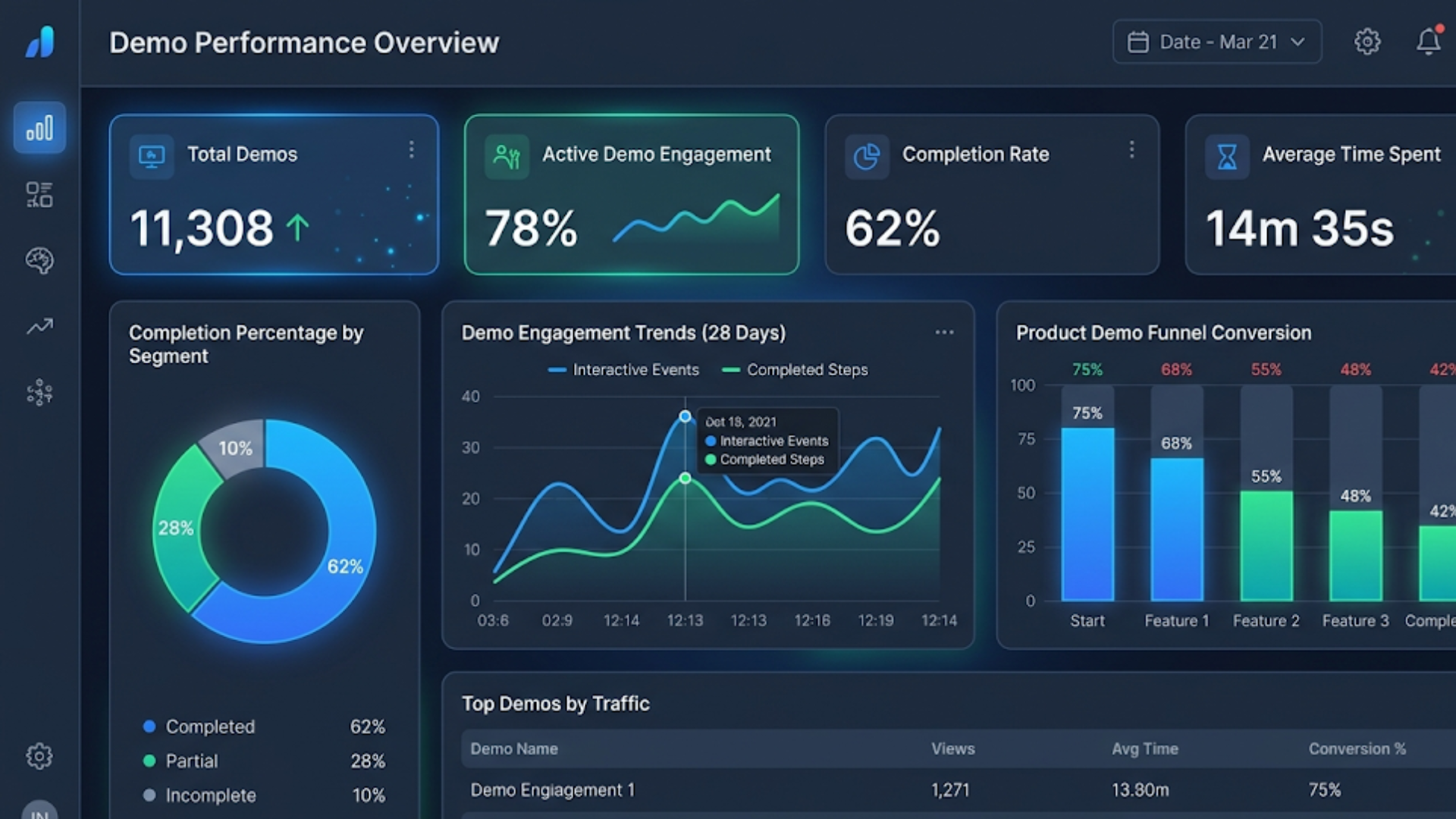
Below are the metrics I recommend tracking first. They fall into groups: engagement, conversion, behavior, technical, and rep performance. You do not need to track everything at once. Start with a few core metrics and add more as questions come up.
1. Demo engagement metrics
Engagement metrics tell you if people are paying attention and where they drop off.
- Number of demos started - How many prospects begin a demo session. Use this as a top-of-funnel activity indicator.
- Demo completion rate - Percentage of demos that reach the end. Low completion often signals length or complexity problems.
- Average time spent - How long prospects stay in the demo. Beware both short times and very long times. Too short could mean they lost interest. Too long might mean they are confused.
- Time on feature - Time spent on each part of the walkthrough. This helps you see where people linger and where they skip.
- Interaction rate - Percentage of viewers who click or use interactive elements. Interactive demos should invite actions. If nobody clicks, the interactions are not compelling.
Example: If your average time on the "Reporting" feature is 2 minutes while the "Integrations" view gets 10 seconds, that tells you one of two things. Either reporting is resonating or integrations are hard to find. A quick follow up question in the demo can uncover which it is.
2. Conversion metrics
Conversion metrics link demos to revenue. These are the ones leadership will want.
- Demo to qualified lead rate - Percent of demos that become qualified leads or move to the next pipeline stage.
- Demo to trial or sign-up rate - Percent of demo viewers who start a free trial or create an account after the demo.
- Demo to paid conversion rate - Percent of demo participants that convert to paying customers.
- Time to conversion - How long it takes for a demo participant to convert to a paying customer.
These metrics help you measure the ROI of demo activities. A large number of demos means nothing if the demo to paid conversion rate is low. I’ve seen companies double revenue simply by optimizing the demo to trial handoff.
3. Demo behavior and feature interest metrics
These metrics show which features draw attention and which get ignored.
- Feature click-through rate - Percent of viewers who interact with a specific feature module in the demo.
- Feature drop-off points - Steps in the walkthrough where users stop or exit.
- Sequence tracking - The order people view features. This reveals the most natural buying path.
- Heatmaps and click maps - Visuals that show where people click within the demo UI.
Quick example: If prospects repeatedly skip your advanced settings page, that might mean you introduced it too early. Move it later in the flow or make it optional. Small sequencing changes can improve demo engagement quickly.
4. Rep performance and interaction metrics
Demos run by reps are both product and sales conversations. Track rep-level metrics so you can coach effectively.
- Average demo length by rep - Long does not equal good. Watch for reps who go off script or who pitch too much.
- Follow-up actions and timing - How soon reps follow up and what they do next.
- Conversion by rep or team - Which reps close more business after demos.
- Script adherence - Whether reps are covering the prioritized demo steps. You can measure this by events fired during demo walkthroughs.
I've coached reps who cut to the price page too quickly. Measuring script adherence flagged that behavior and once we fixed it, demo to close rates improved.
5. Technical metrics
Technical issues kill demos faster than anything else. Track these so you know when performance is a problem.
- Load time - Time to start the demo. Slow loads reduce completion.
- Error rate - Percent of demo sessions that hit a bug or error.
- Browser and device distribution - Helps prioritize fix investments.
- Network quality or latency - Especially important for interactive or video-based demos.
Tip: If demos served to mobile users drop off earlier, test a lighter mobile experience. A few trimming changes often improve conversion on phone users a lot.
How to instrument demo tracking
Setting up product demo analytics is mostly about planning events and naming them so they’re easy to use. Here’s a practical approach.
- Define objectives - What outcome are you optimizing for? More trials, faster closes, better-qualified leads? The objective decides what you track.
- Map the demo flow - Sketch the steps in your demo. Include optional paths. Each step becomes a potential event.
- Pick event names and properties - Use consistent names like demo.start, demo.complete, demo.feature.view, demo.action.click. Include properties: feature_name, step_name, rep_id, session_id, time_spent.
- Tag interactive elements - Buttons, toggles, file uploads, and key navigation items should fire events.
- Capture conversion outcomes - Link demo events to trial signups, account creations, and closed-won events.
- Validate and monitor - Run test sessions, confirm events show up in your analytics, and set alerts for missing or unusual spikes.
Pro tip: Keep event names short and consistent. I once inherited a project with ten different names for the same event. Cleaning that up made dashboards usable again.
Useful demo events and a simple naming scheme
Here’s a compact event list you can copy into your tracking plan. Keep it human readable so your product and growth teams can use it.
- demo.start - fired when a demo begins
- demo.step.view - fired when a demo step loads (property: step_name)
- demo.feature.click - fired when a user interacts with a feature (property: feature_name)
- demo.interaction - fired for any input action like form fill or file upload
- demo.pause - fired when a user pauses or switches away from the demo
- demo.complete - fired when user reaches the demo end screen
- demo.dropoff - fired on early exit (property: step_name, reason)
- demo.followup.request - when a user asks for a follow-up meeting
Link these events back to your CRM user record using user_id or email so you can measure demo impact on pipeline objectively.
Segmentation and cohort analysis
Raw demo metrics tell part of the story. You’ll learn more when you slice by who the user is and where they came from.
- By persona - Sales vs product manager vs developer. Different features matter to each group.
- By source - Paid ads, content, referrals, or inbound leads. Source affects intent and demo behavior.
- By company size - SMBs and enterprises prefer different demos and pacing.
- By feature interest - Group people who spend time on the same features and look at their conversion.
- By cohort - Track cohorts over time to see whether demo changes improve conversion sustainably.
For example, you might find that demos from product-led signups yield quick trials but low paid conversion, while demos from outbound sales take longer but close at higher rates. That insight helps you allocate resources and tailor demo content.
Benchmarks and what “good” looks like
Benchmarks vary by industry, complexity, and price point. Still, these ballpark figures help orient you. I’ll share what I’ve seen in many SaaS products.
- Demo completion rate: 40 to 70 percent
- Average demo length: 8 to 20 minutes depending on complexity
- Demo to trial rate: 10 to 30 percent
- Demo to paid conversion: 5 to 25 percent
Keep in mind that enterprise demos for high-priced products have lower volume but higher conversion value. Compare against similar business models rather than headline averages.
Common demo analytics pitfalls
I've seen many teams fall into the same traps. Avoid these common mistakes so your demo analytics are actually useful.
- Vanity metrics - Tracking only views or sessions without measuring downstream outcomes is useless. Always link engagement to conversion.
- Poor naming conventions - Inconsistent event names make dashboards unreliable. Agree on a naming convention before you track.
- Mixing cohorts - Don’t compare self-serve demo users with enterprise sales demos as if they are the same thing.
- No qualitative follow-up - Data tells you what happened not always why. Combine analytics with short follow-up questions or recordings.
- Attribution errors - Make sure you attribute conversions correctly. Is the demo the true driver or just correlated with another touch?
- Overtracking - Too many events clutters analysis. Track the events you will use for decisions.
Quick aside: when you start measuring, you’ll discover long tail problems. That’s normal. Tackle the highest-impact issues first.
Connecting demo data to revenue
To make demo analytics strategic, tie events to revenue outcomes. Here’s a simple process.
- Map the demo events to CRM stages. For example, demo.complete can map to SQL or Product Qualified Lead.
- Calculate conversion probabilities for each step. What percent of demo.complete becomes paid in 30, 60, 90 days?
- Use uplift tests to estimate impact. If shortening the demo increases completion by 15 percent, how does that change revenue?
- Prioritize changes that increase expected revenue per demo the most.
Example: You run 100 demos per month with a demo to paid rate of 10 percent. If you improve demo completion and increase demo to paid rate to 15 percent, you gain five more customers. Multiply that by your average revenue per customer and you can justify demo improvements financially.
Experimentation and A/B testing
Data without experiments is just observation. Test changes to your demo flow and measure the impact with controlled experiments.
- Test headline changes or opening hooks. Does starting with ROI stories increase time on demo?
- Test feature order. Does reordering modules change demo completion and conversions?
- Test length. Shorter demos often win, but not always. Run experiments to know for sure.
- Test interactivity. Does adding a hands-on exercise increase engagement and conversions?
Keep experiments simple. Test one variable at a time and run tests long enough to reach statistical confidence. In my experience, even small experiments can lead to big wins when stacked over many iterations.
Qualitative insights: recordings, ratings, and follow-up
Numbers tell you where to look. Qualitative feedback tells you what to change.
- Session recordings - Watch a sample of sessions to see hesitation, confusion, or moments of delight.
- Post-demo ratings - Ask a quick one-question rating and one short comment. One sentence answers are gold.
- Follow-up calls - One-minute surveys in your follow-up email can reveal why someone didn't convert.
For example, if several recordings reveal users pausing on one step and looking for a setting, you have a clear fix. Combine these qualitative signals with the heatmaps and time on feature metrics to prioritize improvements.
Privacy and compliance considerations
Product demo analytics involve user behavior data, so be mindful of privacy. Here are a few rules I follow.
- Mask or avoid capturing sensitive input like passwords or personal IDs.
- Get consent where required, especially for session recordings.
- Store data securely and respect retention policies.
- Document what you track and why so legal and security teams can review it.
Small compliance steps early on save you from big headaches later.
Demo analytics tech stack
Pick tools that match your team’s scale and technical skills. Here’s a simple stack that covers most needs.
- Product analytics platform for events and funnels - like Mixpanel, Amplitude, or a newer interactive demo analytics tool.
- Session recording tool - for qualitative analysis.
- CRM - to join demo events with pipeline outcomes.
- BI or dashboarding - for exec-level views and cross-data joins.
If you use interactive demo software, look for built-in demo analytics that track feature clicks and time spent automatically. These reduce instrumentation work and give you immediate insights. At DemoDazzle, we’ve focused on giving teams those out-of-the-box demo engagement metrics so you can iterate fast.
Quick demo optimization playbook
Want something practical you can try now? Here’s a short playbook to run in two weeks.
- Week 1: baseline and hypothesis
- Instrument demo.start, demo.step.view, and demo.complete if not already tracked.
- Pull baseline metrics: completion rate, average time, demo to trial and demo to paid rates.
- Form one hypothesis. For example: reducing the first step to a 60 second hook will increase completion by 10 percent.
- Week 2: test and iterate
- Run the test with a random split of visitors or prospects.
- Collect both quantitative and qualitative feedback from session recordings.
- Analyze results and deploy the winner if statistically meaningful.
- Ongoing
- Repeat for the next bottleneck - maybe feature sequencing or rep handoff.
- Document changes and keep a changelog tied to conversion impact.
Small, focused cycles beat big rework. Keep the scope tight and measure the outcome.
Real-world examples
Here are a couple of simple examples to illustrate how demo analytics drives improvement.
Example 1 - SaaS analytics tool: Their demo completion rate was 45 percent. After instrumenting feature-level time on page, they discovered an advanced settings step with a 70 percent drop-off. They moved that step to an optional module and added an “Interested in advanced settings” checkbox at the end. Completion rose to 62 percent and demo to trial conversion improved by 25 percent.
Example 2 - HR software: They tracked demo.followup.request and found certain reps had double the follow-up request rate. Watching recordings showed those reps started with a 90 second ROI story rather than a product tour. Rep coaching replicated that opening across the team and the demo to sales-qualified-lead rate increased by 15 percent.
Common questions I hear
Q. How many events should I track? A. Track the fewest events that answer your key questions. Start small and add events when you need to analyze something deeper.
Q. Should demos be shorter? A. Often yes. People have shorter attention spans. But test it for your audience. Complex enterprise demos may need longer demos broken into digestible chunks.
Q. How do I measure the ROI of demo improvements? A. Tie demo events to CRM outcomes and estimate the change in revenue per demo. Multiply by volume to show impact.
A checklist to get started
- Define the primary demo outcome you care about
- Map the demo flow and select 5 to 10 core events
- Create a consistent event naming convention
- Track conversion outcomes in your CRM
- Segment by persona, source, and company size
- Run a small experiment to validate one hypothesis
- Collect session recordings for qualitative context
- Review results weekly and iterate
How Product Demo Analytics Turn SaaS Demos into High-Converting Growth Engines
AI video creators are transforming how small businesses produce content. Instead of relying on expensive production teams, you can now create high-quality videos in minutes using AI tools. From marketing promos and product demos to social media content, these platforms help you save time, reduce costs, and scale your efforts. In this guide, explore the best AI video creators, key features to look for, and how to use them effectively to grow your business.
FAQs
1. What is product demo analytics?
Product demo analytics refers to tracking and analyzing how users interact with your product demos. It includes metrics like engagement, feature interactions, drop-offs, and conversions to help you optimize demo performance and increase revenue.
2. Which product demo metrics should I track first?
Start with core metrics like demo completion rate, average time spent, feature interaction rate, and demo-to-conversion rates. These provide quick insights into engagement and overall effectiveness without overcomplicating your analytics setup.
3. How can demo analytics improve conversion rates?
Demo analytics help identify where users lose interest, which features resonate most, and what drives action. By optimizing these areas such as improving flow, simplifying steps, or highlighting key features you can significantly increase demo-to-trial and demo-to-paid conversions.
4. Do I need technical expertise to set up demo analytics?
Not necessarily. Many tools, including DemoDazzle, offer built-in analytics that automatically track user interactions, reducing the need for complex instrumentation and allowing teams to focus on insights and optimization.
Final thoughts
Demo analytics is one of the highest leverage ways to improve SaaS conversions. It turns guesswork into experiments and opens a path to predictable improvement. Start with a few clear metrics, connect them to real business outcomes, and keep the loop tight between insight and action.
If you want a shortcut, try demo software that captures engagement metrics out of the box and integrates with your CRM. It saves hours of engineering time and gives you immediate answers you can act on.
Helpful Links & Next Steps
Ready to improve your demo performance? Book your free demo today and see what demo analytics can reveal.