Interactive Demo Software: Key Features Checklist
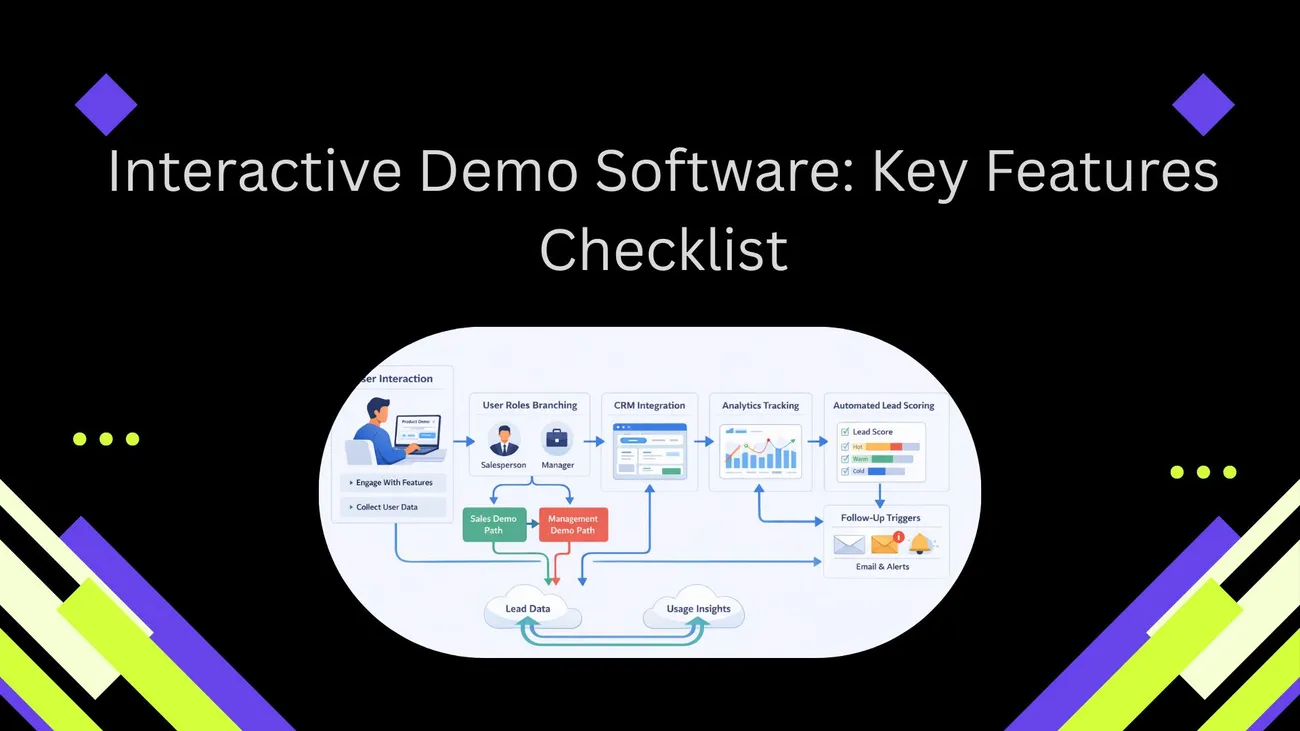
This blog explains why self‑guided interactive demo software matters and provides a practical checklist to evaluate, select, and implement it. It argues live demos are costly and static videos fail to engage, while interactive demos scale outreach, shorten sales cycles, and surface qualified leads. The post organizes assessment across creation/editing, interactivity (branching, realistic data), analytics and CRM/marketing integrations, personalization, lead capture, distribution, performance, security, accessibility, branding, support, and pricing. It also highlights common pitfalls, a quick scoring template, and a 30‑day pilot plan. Core advice: prioritize easy authoring, meaningful analytics, and solid integrations.
If you sell software, run a product team, do growth marketing, or lead customer success, you know demos matter. But live demos are expensive and inconsistent. A self-guided interactive demo solves that. It scales your demos, shortens the sales cycle, and helps users see value faster.
I've worked with sales teams and product managers who thought a quick screen recording would do the job. It rarely did. People skip ahead, get lost, or never reach the "aha" moment. Interactive demo software fixes a lot of that. It lets prospects try a product without installing anything. Good tools also give you insight into what people actually did inside the demo.
This post provides a useful checklist of elements to assess when choosing interactive product demonstration software. When you compare providers, develop a business case, or want to enhance demo-to-trial conversion, use it. I'll discuss typical traps, impart advice gathered from team collaboration, and keep the examples simple such that you can implement them immediately.
Interactive demonstrations: why they are still important
Before committing, buyers want to try out software. They investigate their own time. They will go if your demonstration is passive or difficult to use. While you record indications indicating who is interested, interactive demonstration technologies let users investigate at their pace.
Interactively demonstrated from a practical perspective help in three primary areas:
- They cut friction. No installations, no training, no extended sales calls.
- They enhance qualifications. You know who completes important flows and can rank outreach.
- They hasten product acceptance. Prospective customers who use the product are more likely to convert and then start to use it.
In my experience, sales teams adding self-guided demonstrations reduce demo time by half and close more transactions. Marketing teams create better leads using these. Product teams employ them for release previews and onboarding processes. Thus, it is not merely a sales strategy. It reaches the whole funnel.
How one should interpret this checklist
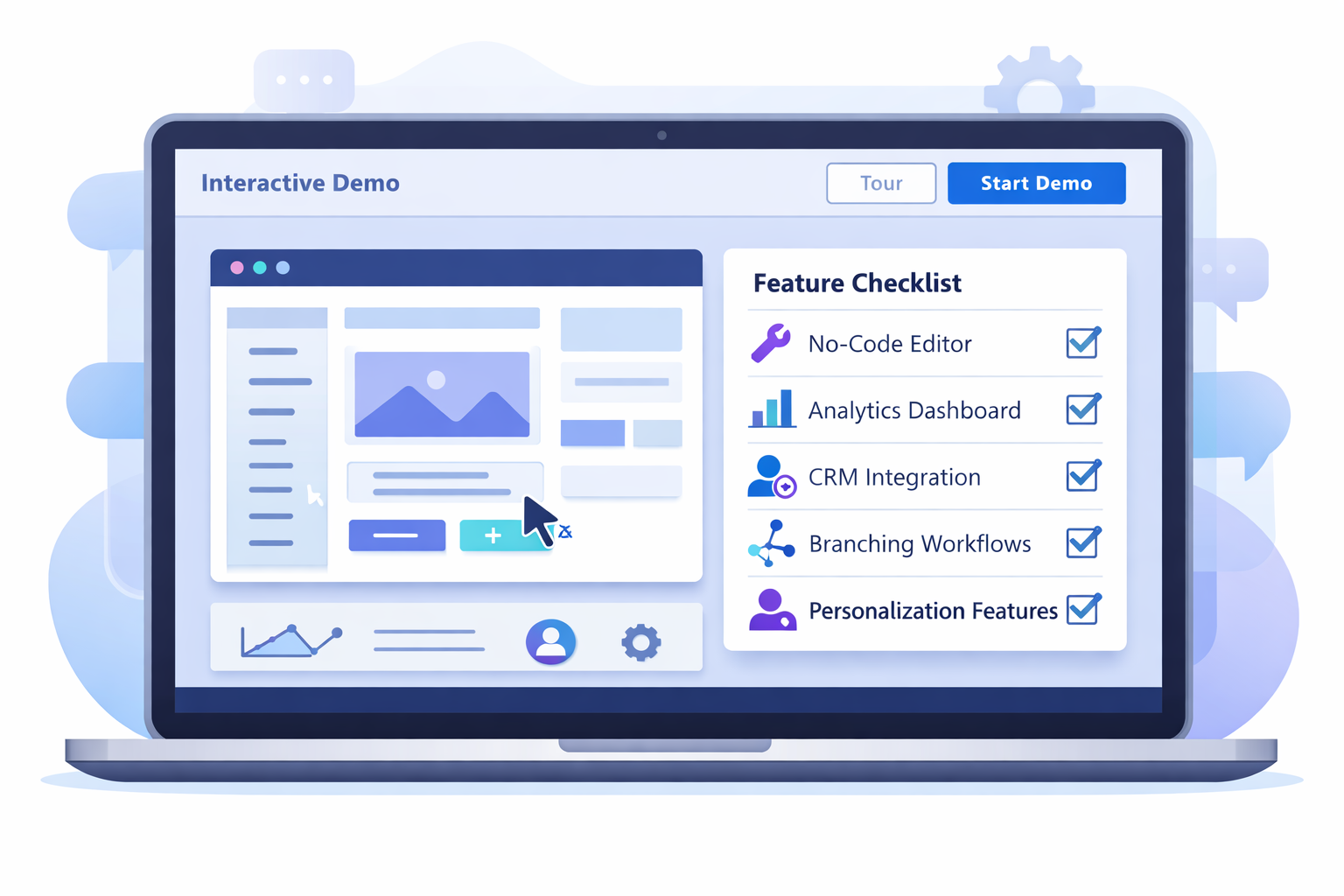
This checklist divides features into categories relevant in assessment: creation and editing; engagement and interactivity; data and integrations; security and operations; and practical business elements like pricing and support. Think of it as both a speedy audit and a purchasing guide. You may race against tools like Demodazzle or others.
I will highlight red flags and little triumphs with great significance. Beginning with ease of authorship, analytics, and integrations will help you save time. Those three alone can determine whether your demo program will succeed or fail.
Creation and editing—build demos devoid of headache.
First rule: designers shouldn't have to code. Demos have to be created or adjusted by sales reps, product marketers, and customer success managers alike. Adoption slows if your tool locks content production to engineers.
- No-code or low-code editor. Look for drag and drop steps, inline text edits, and visual flows. It should feel like editing a slide deck, not writing HTML.
- Fast authoring. You should be able to create a basic demo in under an hour. Templates help here. If every demo takes days, you will only have one or two static demos.
- Prebuilt templates. Good products include sales-ready templates: onboarding, admin tasks, three-minute tours, and feature highlights. Use them as starting points.
- Version control and drafts. Teams iterate. Keep versions, let people preview changes, and roll back if needed. No one wants to test in production.
- Live preview and device rendering. The editor should show how the demo looks on desktop and mobile. If creators guess how it will appear, expect user confusion.
Common mistake: building a single demo and never updating it. Buyers expect current UIs. If your demo shows an old layout or feature that changed, it erodes trust. Keep a simple process for updates and assign ownership.
Interactivity and user experience - keep prospects engaged
Interactivity is the whole point. A demo that looks interactive but does not respond to user choices is worse than a static video. Evaluate how a tool lets users explore and control the narrative.
- Self-guided flows. Users should be able to click through at their pace, with optional guidance. You want both freedom and structure.
- Guided tours and tooltips. Add contextual hints, callouts, and micro copy that explain value without interrupting the flow.
- Branching logic. Let users choose paths based on roles or goals. Sales reps can send targeted demos: admin track, end user track, or power user track.
- Simulated data and scenarios. Demos feel real when they use believable data. Avoid placeholder names. Use industry-specific examples for your buyer persona.
- Input fields that feel real. Allow typing, toggles, file uploads, and simple interactions so users can test workflows. These interactions should not require backend connections unless you want real integrations.
- Hotspots and calls-to-action. Clearly indicate next clicks for consumers. Use progressive disclosure to avoid interface overwhelm.
- Playback and skip controls. Playback and Skip buttons Users should have the option to rewind, pause, or jump. This honors their time and aids learning.
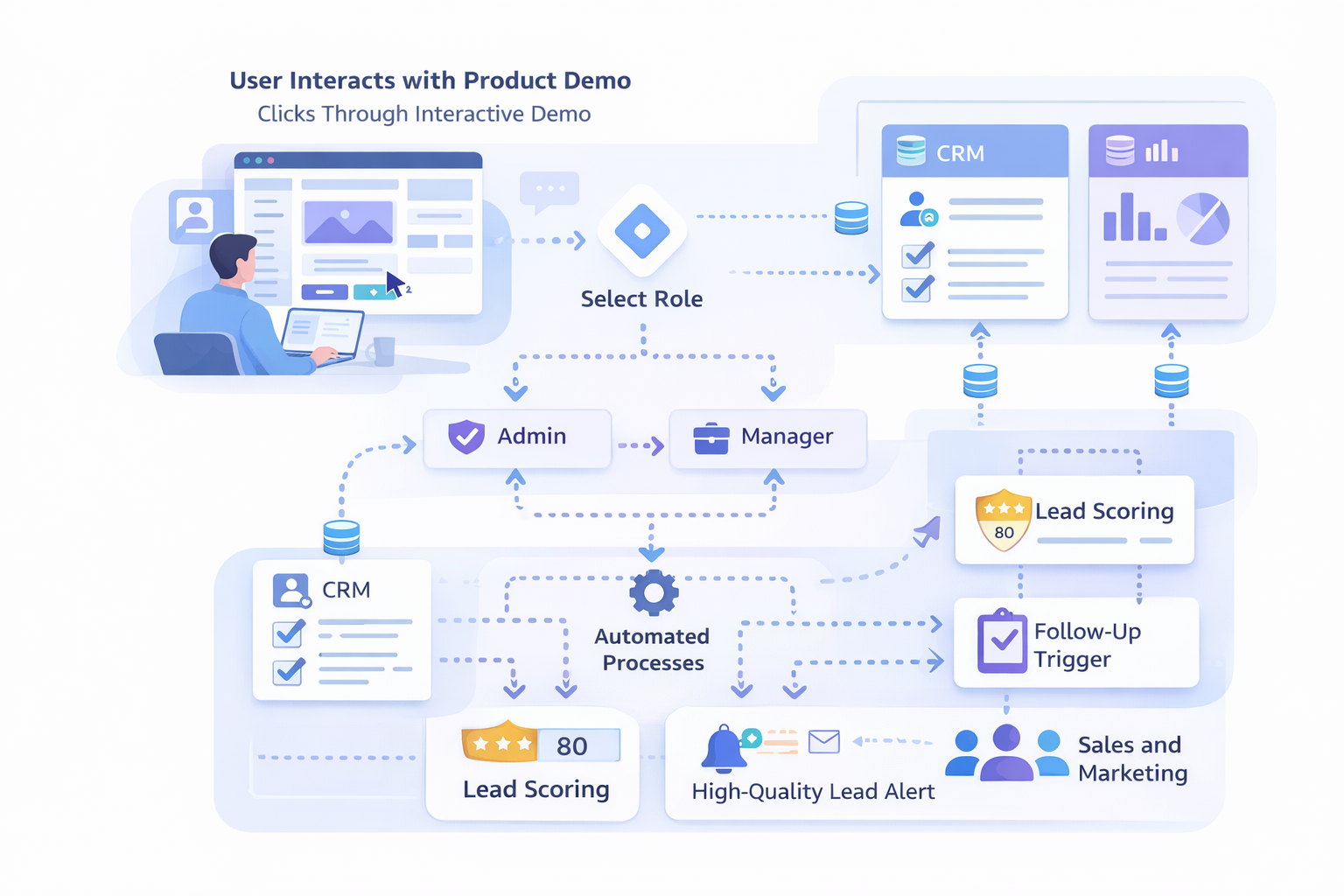
Quick example: Should you sell CRM, establish a demo path for a sales rep outlining how to add a lead, log an activity, and follow a deal. For managers have a second route stressing forecasting and team dashboards. Such basic role-based branches improve relevance.
Analytics and engagement tracking - measure what matters
Data is where demo software develops into a development tool. You need insights to prove ROI, arrange leads, and improve content. The necessary analytical elements are found here.
- Per-session tracking. Find out where users dropped off, how much time they spent, and which flows they finished.
- Event-level analytics. Follow form submissions, click tracking, and feature interactions. Don't be satisfied with merely page views.
- Funnel visualization.
- Know the step conversion rates. When does a user halt? mend those seeps.
- Touchpoint scoring. Assign scores for demo actions: viewed pricing, completed onboarding flow, or used a premium feature. Use scores to qualify leads automatically.
- Heatmaps and session recording. These help you understand behavior visually. Heatmaps show where people click. Recordings reveal confusion points.
- Exportable reports and dashboards. Sales ops and marketing both rely on information available in business intelligence systems. Connect or export without effort.
- Real-time notifications. Tell sales representatives when a high-value client finish a demo stream. Outreach timing counts.
Tip: Stop fixating on every statistic. Start with a few high-impact signals: conversion to trial, time on crucial task, and demo completion. Those indicate if the demonstration is working.
Integrations - fit into your existing stack
A demo tool is not a silo. It should plug into your CRM, marketing automation, analytics, and product analytics. Integration is how demo signals become actionable.
- CRM sync. Push demo engagement data into Salesforce, HubSpot, or your CRM of choice. That way reps see behavior in their workflow.
- Marketing automation. Trigger emails or nurture tracks based on demo activity. If someone completes the "admin" path, send them admin-focused content.
- Web analytics. Connections to Google Analytics or Segment help you link demo traffic to broader site behavior.
- Product analytics and CDP. Send events to Mixpanel, Amplitude, or your CDP so product teams can correlate demos with in-product use.
- Single sign-on and SSO. For enterprise buyers, SSO makes demos feel more secure and polished.
Watch out for tools that only offer manual CSV exports. That creates extra work and delays follow-up. Automated, bi-directional integrations are worth the investment.
Personalization - tailor demos for real buyers
One size fits no one. Personalization increases conversion because people feel the demo speaks to them. Even small customizations can make a big difference.
- URL parameters and prefill. Make it possible to prefill fields like company name or role from a tracking link. Prospects notice small personal touches.
- Account-based paths. Send different flows to strategic accounts. Show features that matter to their industry or persona.
- Dynamic content. Change labels, examples, and UI copy based on buyer segment. It should be easy to swap out text without rebuilding the demo.
Example: If a prospect from finance lands in a demo, show the billing and reporting flows first. For operations teams, surface integrations and admin controls. Simple swapping like this improves time to value.
Lead capture and handoff - make it easy to convert interest
A demo should both educate and help you capture interest. Think beyond a single gated form. Capture signals throughout the experience.
- Progressive capture. Ask for minimal info up front and request more details later based on engagement. This reduces friction.
- Pre and post-demo forms. Use a quick gate for lead capture and a follow-up form that asks about use case and budget when someone finishes a key path.
- In-demo CTA options.
- From the demo interface, provide to set up a live demonstration, begin a free trial, or speak with sales personally.
- Lead enrichment. Enrich leads automatically with company data so reps don't have to guess.
Common pitfall: gating too early and losing the lead. If your form blocks interaction, people bounce. Use lightweight gates and save bigger asks for later in the demo when they are engaged.
Sharing, embedding, and distribution
Your demonstration has to be easily sharable. Marketing will embed demonstrations on landing pages, reps will email links, and partners could want to co-brand demonstrations for their clients.
- Public links and private links. Allow teams the freedom to share a password-secured version for commercial interests or an open demo.
- Demos should be able to be inserted in knowledge base papers, websites, or within product tours.
- Monitor campaign performance and arrange links neatly for communication.
- Shareable snapshots. Highlight a feature by having reps send a bookmarked step or a brief replay.
Pro tip: Establish a single central demo hub for your group. Place approved messages, templates, and share links together so reps won't send outdated copies.
Performance, reliability, and offline considerations
Nobody favors a slow demonstration. How your product performs influences how it is viewed. Under actual circumstances, test for latency and load.
- Fast load times. Demos should open rapidly even on mobile networks. A slow demonstration implies lost interest.
- Graceful degradation.Even if a device or browser does not enable a function, the demo should still run without crashing.
- Local caching and offline playback. Reps on planes or conferences would benefit from a cached version that operates without internet access.
- Scalability . If marketing runs a big campaign, the demo platform should handle spikes in traffic without errors.
Test demos on low-end devices and public WiFi. What looks great on a dev machine may choke on a cheap Chromebook or a phone on a conference hall network.
Security, privacy, and compliance
Security is not optional. Enterprise buyers will ask. Make sure the tool meets the basics and is transparent about compliance.
- Data handling and retention policies. Know what data the vendor stores, for how long, and how you can delete it.
- GDPR and CCPA support. If you serve EU or California customers, the tool must cooperate with privacy requests.
- SSO and access controls. Manage who can edit or publish demos, and who can access sensitive shared demos.
- Encryption. TLS for transit and, ideally, encryption at rest for stored data.
- Enterprise agreements. For large deals, you will want a clear contract on SLAs and liability.
Red flag: vendors that are vague about security. If they cannot explain where data lives and who can access it, move on.
Accessibility and localization
Make demos usable for as many people as possible. Accessibility helps sales and is the right thing to do.
- Keyboard navigation and screen reader support. Test demo flows without a mouse.
- Alt text and readable labels. Ensure content is readable by assistive tech.
- Localization and multi-language support. If you sell globally, the ability to swap languages without rebuilding is a big time saver.
Small wins here matter. Offering a demo localized by region shows you understand the buyer's world. Even translating button labels and example data can increase engagement in new markets.
Customization and branding
For enterprise and partner channels, white-labeling and brand control are useful.
- White-label options. Remove vendor logos and use your own domain or subdomain when needed.
- Theme control. Match fonts, colors, and messaging so the demo feels like your product.
- Custom domains. Helpful for brand consistency and tracking.
Be pragmatic. Not every demo needs a custom domain. Use white-labeling where it impacts conversion or enterprise acceptance.
Support, training, and team adoption
Adoption is the hardest part. A feature-rich tool is only useful if your team uses it. Ask about onboarding and support.
- Onboarding and setup help. Look for vendor support for initial templates and best practices.
- Training materials. Enablement docs, short video tutorials, and playbooks that sales can use.
- Customer success and SLAs. Know your support channels and response expectations.
- Community and examples. Templates from other companies and community forums speed learning.
From experience, the companies that win here invest in one or two demo champions. Those people keep templates updated and coach new reps on when to send which demo.
Pricing and ROI - what to budget for
Pricing models vary a lot. Some vendors charge per user, others per demo, and some on usage. Think about how you plan to scale.
- Transparent pricing. Avoid tools with hidden fees for basic features like integrations or SSO.
- Usage vs seats. If many reps will use demos a little, a per-seat model may be expensive. If a few power users will own content, seat pricing can make sense.
- Cost of ownership. Factor in time to build and maintain demos, plus any professional services for implementation.
- ROI metrics. Track demo-to-trial and demo-to-meeting conversion, plus downstream metrics like conversion to paid and time to close. Show finance real numbers when you ask for budget.
Simple rule: build a business case with conservative estimates. If a demo increases conversion by even a few points, it can pay for itself quickly because demo content scales better than live sessions.
Common mistakes and pitfalls
I've seen teams make the same mistakes over and over. Here are the ones to avoid.
- Over-gating demos. Forcing long forms before any interaction kills engagement. Use lightweight gates and progressive capture.
- One demo fits all. Resist the temptation to send the same demo to everyone. Segment your audience and tailor content.
- No analytics. If you do not measure, you will not know what works. Start simple and iterate.
- Poor maintenance. Demos need updates when UI or flows change. Assign a demo owner and a cadence for review.
- Relying only on video. Videos are great for storytelling but not for exploration. Mix formats and use interactive demos for hands-on experience.
Aside: a sales leader once told me they lost a promising demo because the demo still used the old logo. Small details signal sloppiness. Keep things current.
Evaluation checklist - quick scoring template
Here is a short way to score vendors during your evaluation. Rate each item 1 to 5 and sum the score. Focus on the items that match your priorities.
- Ease of authoring and templates
- Self-guided and branching interactivity
- Analytics at event level
- CRM and marketing integrations
- Personalization and ABM features
- Sharing, embedding, and link controls
- Performance and reliability
- Security and compliance
- Accessibility and localization
- Support, training, and onboarding
- Pricing model fit
Tip: If you score below a 3 on authoring, analytics, or integrations, the tool will likely cost you adoption or time. Those three are the hardest to work around later.
Quick implementation plan - get started in 30 days
You do not need to build a massive demo library to start seeing value. Follow this simple plan to launch quickly.
- Week 1 - Pick a vendor and set up a pilot. Choose a single sales and marketing use case, like a 3-minute demo for lead gen.
- Week 2 - Build the demo from a template. Create a role-based path and add a lightweight form for capture.
- Week 3 - Integrate with CRM and set up alerts for qualified leads. Create one nurture email triggered by demo completion.
- Week 4 - Measure results, collect feedback from reps, and iterate. Expand to two more demo templates based on what you learn.
This plan keeps scope tight and shows quick wins, which is critical for getting buy-in. You can expand templates and integrations after you prove impact.
Best practices for demo content
Good demos teach by doing. They show the simplest path to value. Here are some quick rules I use when advising teams.
- Start with a clear goal. What is the single outcome you want the user to experience?
- Keep flows short. Aim for three to five steps for most demos.
- Use realistic sample data. Examples should reflect the buyer's industry and typical use case.
- Make CTAs contextual. If a user completes a billing flow, offer a meeting with billing specialists.
- Test with real people. Watch a few prospects or internal colleagues go through the demo and note confusion points.
One simple example: a project management tool demo might show creating a project, assigning a task, and viewing a dashboard. If the buyer sees how to get a task done in three clicks, they get the point fast.
Why demodazzle might be worth a look
If you are evaluating interactive demo builders, demodazzle is built for teams who want fast authoring, flexible personalization, and strong analytics. It supports self-guided demos, branching logic, and integrations with common CRMs and analytics tools. From what I have seen, it balances ease of use for marketing and power features for product teams.
I've noticed teams get the most value when they use demo software like demodazzle to create role-based demo tracks and link those directly to CRM signals. That setup makes follow-up timely and relevant, and it gives product teams a clean pipeline of demo-based feedback.
Final thoughts - pick the tool that fits your process
Interactive demo software is not a silver bullet, but it is a practical lever you can pull to scale demos, improve qualification, and accelerate adoption. Focus on three areas first: easy authoring, meaningful analytics, and solid integrations. If you get those right, the rest becomes easier to manage.
Don't overcomplicate the first launch. Start with a single, high-impact demo, measure, and iterate. Assign demo ownership and set a simple maintenance cadence so your demos stay current. And remember to personalize for role or industry when it counts.
If you want to test these ideas on a real tool, try a short pilot. You will learn faster than planning indefinitely.
Faqs
Helpful Links & Next Steps
Ready to see it in action? Book a free demo today and test how interactive demo software can boost your demo-to-trial conversion.